 Tavlum
Why preview it first
A bob is one of the biggest changes you can make to your hair, because it removes length all at once and puts the line of the cut right next to your jaw. Where that line falls changes how your face looks: a cut at the jaw draws attention to the chin and cheekbones, a cut just above the shoulders feels softer, and a fringe changes the whole top half of the face.
Seeing a few bob lengths on your own photo makes it easier to decide how short to go, whether you want a fringe and how much texture you want before you sit in the salon chair.
Tavlum changes only what you describe and is meant to leave the rest of the photo as it was, so the comparison shows the change rather than a different photo.
What we tested
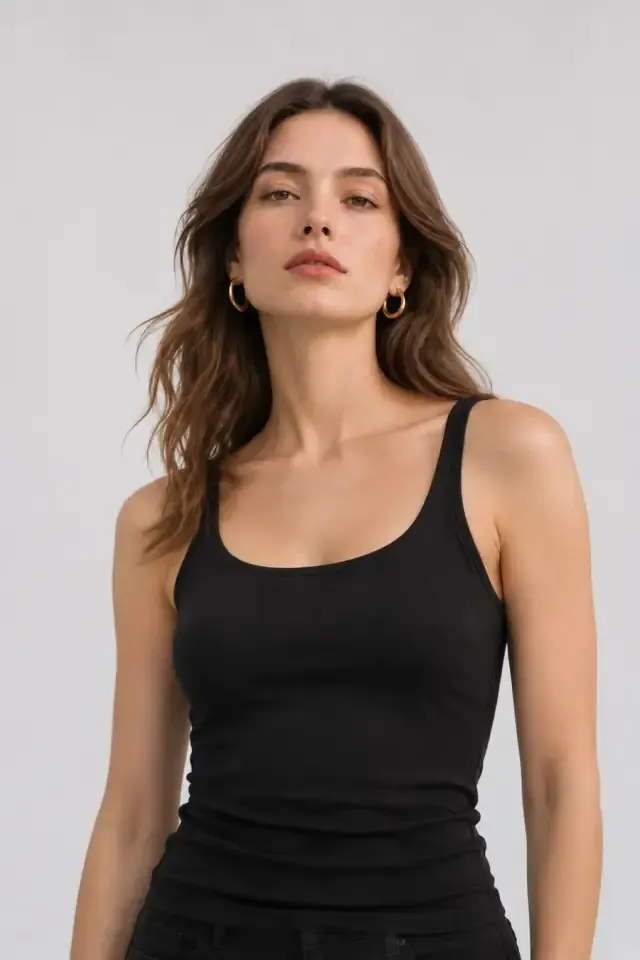
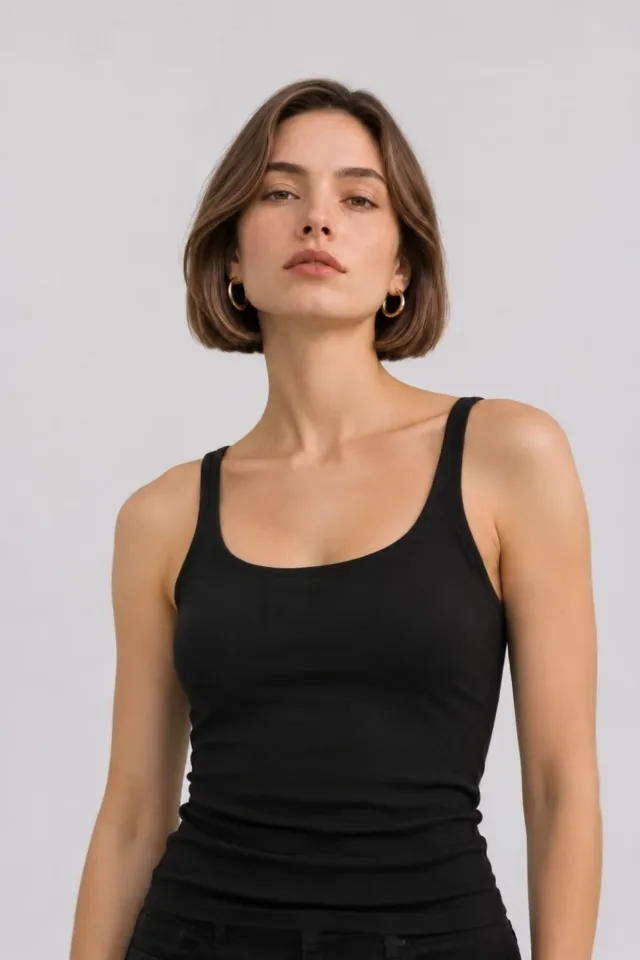
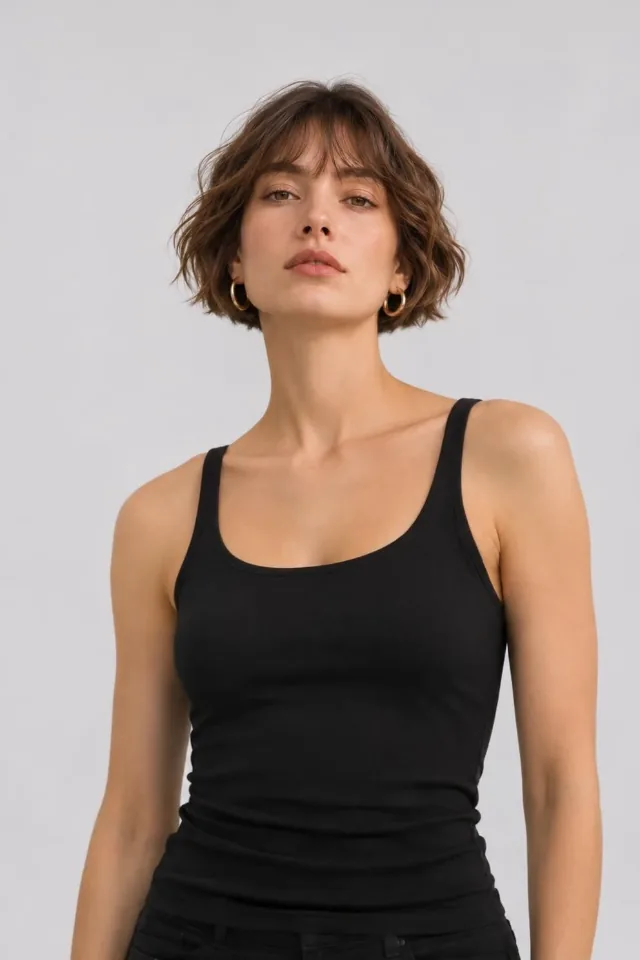
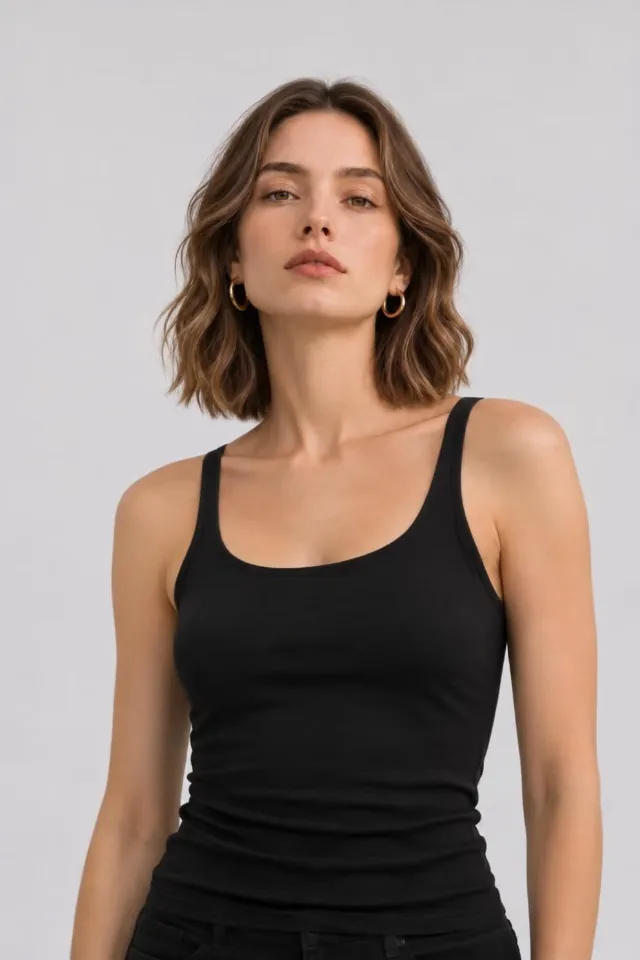
We ran three prompts on the same front-facing portrait on 27 Nov 2026, using Tavlum's Free Edit with a short text description and no reference image. Each run used 1 credit.
- Classic chin bob: a blunt, even cut ending at the jawline with a soft side part.
- French bob: a short cut just above the jaw with a wispy eyebrow-length fringe.
- Long bob (lob): a cut just above the shoulders with a middle part and loose waves.
In all three results her face, skin, expression, pose and the grey background stayed close to the original. The hair was redrawn from the crown down in each run. The French bob changed her look the most, because the fringe covers part of the forehead. The lob was the gentlest change and kept some of her original waves. Look closely at the ends near the neck: the AI draws those strands, so the exact length is an estimate. Each result above sits next to its original photo, so you can compare the details for yourself before trying your own.
How to do it with your own photo
- Upload a clear, front-facing photo. Face the camera in soft, even light, with your face, hairline and shoulders visible. A plain wall behind you keeps edges clean.
- Describe the change. Say the length (at the jaw, just above the shoulders), the fringe (none, wispy, blunt) and the texture (sleek, bent, wavy). Short, concrete descriptions work better than style names alone.
- Add a reference photo if you have one. A product or inspiration photo helps the AI match a specific item. Make sure you have the right to use it.
- Generate and compare. Drag the slider over the result to see exactly what changed. Change one detail at a time and generate again, so you can see what each choice does.
- Save the ones you like. Keep your favourite results side by side in your history and use them to decide what to buy, book or try in person.
Getting a realistic result
- Keep your face straight to the camera. A tilted head or strong side angle makes the result less even.
- Use soft daylight. Harsh shadows and backlight hide edges and change colours.
- Pull hair away from the area you are changing, unless the change is the hair itself.
- Avoid busy backgrounds. Thin edges stay crisp against a plain wall.
- Repeat the run. Two runs with the same description can differ a little, so generate again if one detail looks off.
Talking to your stylist
Bring two or three saved results to your appointment rather than a single photo. Seeing a few options side by side makes it easier to explain what you like and what you do not, for example the length but not the fringe, or the colour but a softer version of it.
Ask your stylist how your hair type, density and natural texture will change the result, how long the style takes to do each morning and how often it needs a trim or a colour refresh. A preview shows the end result on a good day; your stylist can tell you what it takes to keep it looking that way. If you are unsure, start with a smaller change and go further next time.
Bob styles worth comparing
- Chin bob: The classic choice. A blunt line at the jaw looks sharp and neat.
- French bob: Shorter, with a fringe and messy texture. It suits fine to medium hair.
- Lob: A safe first step if you are not ready to lose all your length.
- Angled bob: Shorter at the back and longer at the front, which adds movement.
- Bob with curtain bangs: A soft fringe parted in the middle that frames the face.
Who this helps
- People thinking about a big chop who want to see it first.
- Anyone choosing between a bob and a lob.
- Stylists showing a client a few lengths before cutting.
- People growing out a short cut who want to plan the next stage.
What a preview can and cannot do
An AI preview redraws part of your photo. It is meant to keep everything else the same, but small details near the change, such as stray hairs, jewellery or the edge of clothing, can shift a little. It does not measure you, so it cannot tell you about size, fit or comfort. Use it to compare looks and narrow down choices, then check the real thing. If a result looks wrong, generate again or change one word in your description; failed generations are refunded automatically.
Check the real thing before you buy
A preview shows the shape and length on your photo. It cannot tell you how your own hair will behave once it is cut: thick hair can puff out, fine hair can fall flat, and curls shrink when they dry. Bring your favourite result to your stylist and ask how your hair type will change the shape, how often it will need a trim and how long it takes to style each morning.
AI previews are illustrative and may alter small details. They do not determine size or fit.